Petals Studio

The dialog to choose the services to invoke is not enough intuitive

Details

  • Type: Bug Bug
  • Status: Closed Closed
  • Priority: Major Major
  • Resolution: Fixed
  • Affects Version/s: 1.1.1
  • Fix Version/s: 1.1.1
  • Component/s: Petals Tools
  • Security Level: Public
  • Description:
    Hide

    There is a problem in the creation of a SE EIP with the pattern router with the creation wizard.
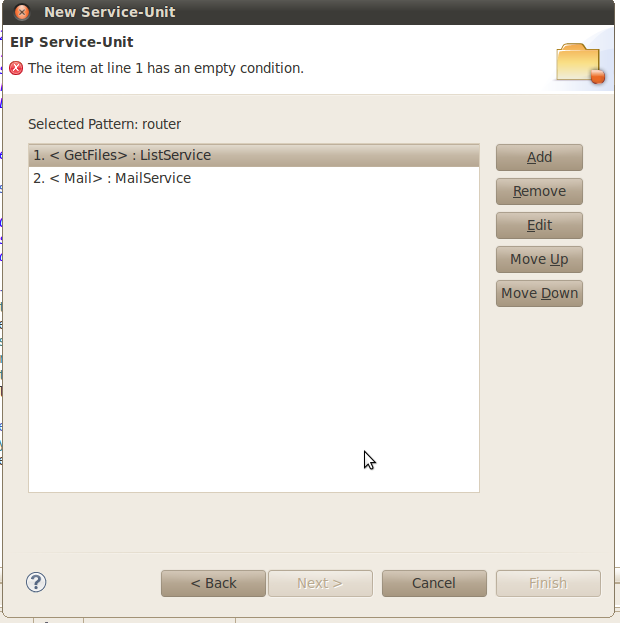
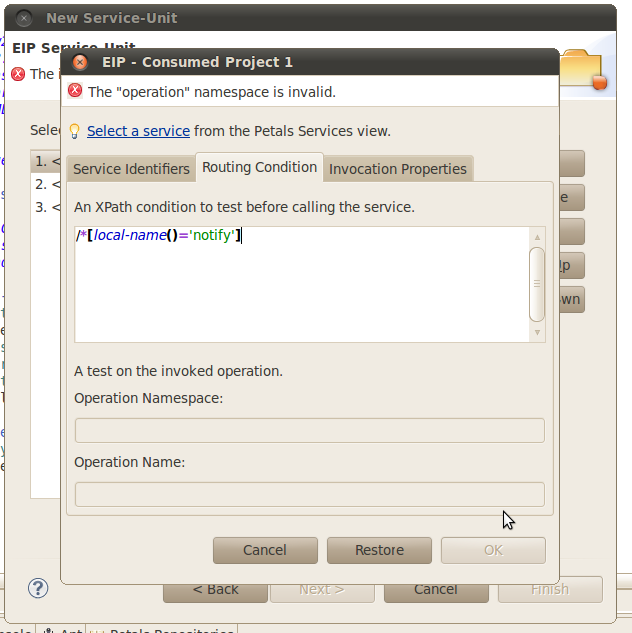
    In the dialog box, on the page where you select the services to consume (cf EIP_router_1.png), if you edit a consumed service an try to enter a running condition (XPath or operation), there is the following error message "The "operation" namespace is invalid" displayed at the top of the dialog box and it is impossible to click on OK (cf EIP_router_2.png).
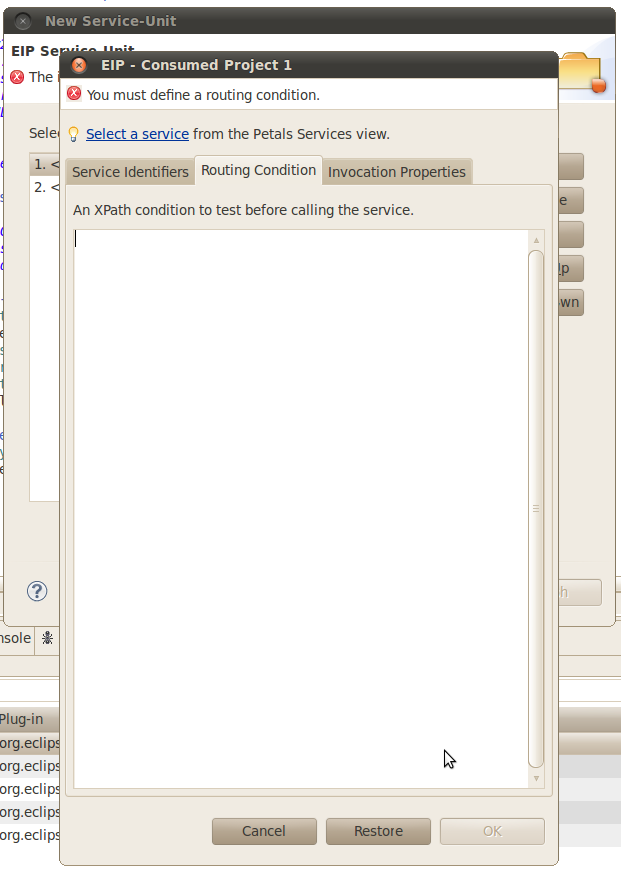
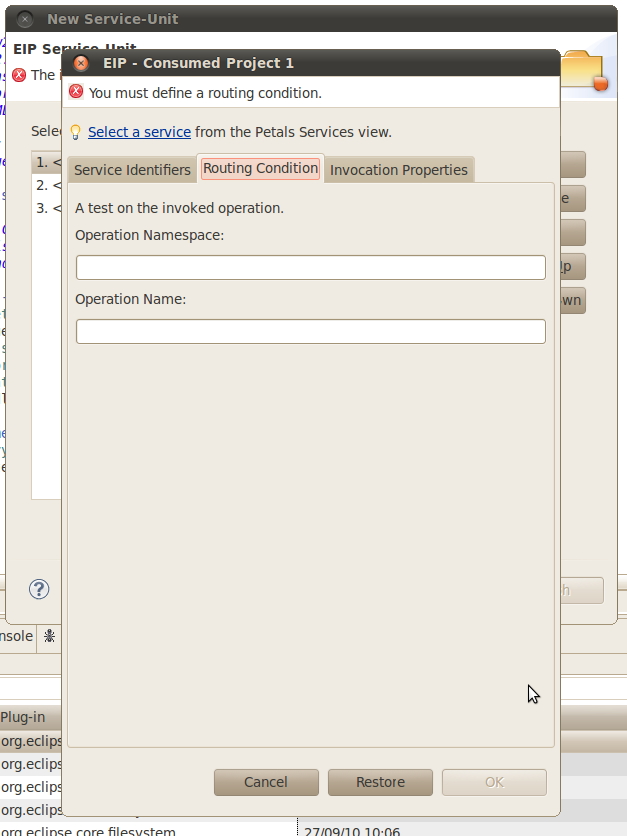
    Then if you click on Cancel and try again to edit the same consumed service to enter a running condition, it is only possible the XPath expression or the operation but not the both (although you clicked on Cancel previously) (cf EIP_router_3.png & cf EIP_router_4.png).

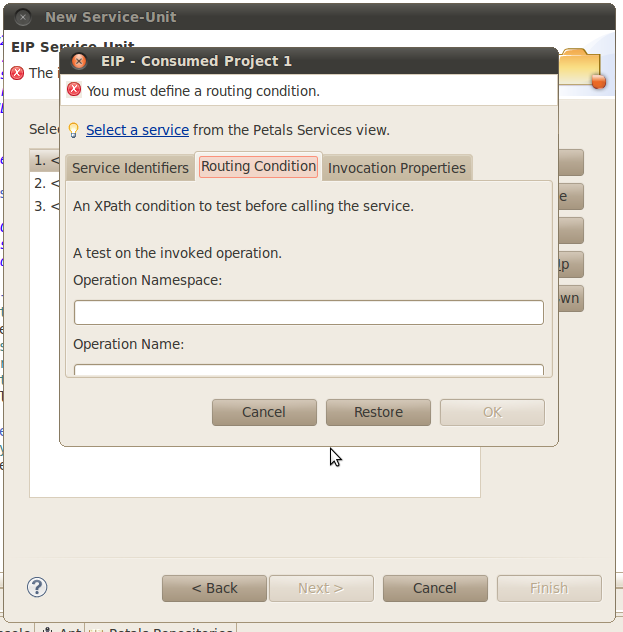
    On another hand, the height of the consumed project edition dialog box must be greater because when you open this dialog box and you clicked on the tab Routing Condition, it is necessary to increase the height to see all the content of the tab (cf EIP_router_5.png).

    Show
    There is a problem in the creation of a SE EIP with the pattern router with the creation wizard. In the dialog box, on the page where you select the services to consume (cf EIP_router_1.png), if you edit a consumed service an try to enter a running condition (XPath or operation), there is the following error message "The "operation" namespace is invalid" displayed at the top of the dialog box and it is impossible to click on OK (cf EIP_router_2.png). Then if you click on Cancel and try again to edit the same consumed service to enter a running condition, it is only possible the XPath expression or the operation but not the both (although you clicked on Cancel previously) (cf EIP_router_3.png & cf EIP_router_4.png). On another hand, the height of the consumed project edition dialog box must be greater because when you open this dialog box and you clicked on the tab Routing Condition, it is necessary to increase the height to see all the content of the tab (cf EIP_router_5.png).
  • Environment:
    os:Linux PetalsStudio:RC 1.1

Activity

Hide
Vincent Zurczak added a comment - Mon, 27 Sep 2010 - 20:27:53 +0200

In the dialog box, on the page where you select the services to consume (cf EIP_router_1.png), if you edit a consumed service an try to enter a running condition (XPath or operation), there is the following error message "The "operation" namespace is invalid" displayed at the top of the dialog box and it is impossible to click on OK (cf EIP_router_2.png).

I think I induced you in error this morning (sorry).
In fact, this error comes from the third tab. The one that defines the invocation properties.
I should switch the two tabs, so that there is no ambiguity. You would have seen it before.

Then if you click on Cancel and try again to edit the same consumed service to enter a running condition, it is only possible the XPath expression or the operation but not the both (although you clicked on Cancel previously) (cf EIP_router_3.png & cf EIP_router_4.png).

This is normal. You cannot mix both kind of conditions.
The first condition kind defines the kind of all the other conditions within this EIP.
I should also add a message the first time to explain it.

On another hand, the height of the consumed project edition dialog box must be greater because when you open this dialog box and you clicked on the tab Routing Condition, it is necessary to increase the height to see all the content of the tab (cf EIP_router_5.png).

You are right.
I will update the title of this bug. For me, most of your troubles come from a non-intuitive UI.

Show
Vincent Zurczak added a comment - Mon, 27 Sep 2010 - 20:27:53 +0200
In the dialog box, on the page where you select the services to consume (cf EIP_router_1.png), if you edit a consumed service an try to enter a running condition (XPath or operation), there is the following error message "The "operation" namespace is invalid" displayed at the top of the dialog box and it is impossible to click on OK (cf EIP_router_2.png).
I think I induced you in error this morning (sorry). In fact, this error comes from the third tab. The one that defines the invocation properties. I should switch the two tabs, so that there is no ambiguity. You would have seen it before.
Then if you click on Cancel and try again to edit the same consumed service to enter a running condition, it is only possible the XPath expression or the operation but not the both (although you clicked on Cancel previously) (cf EIP_router_3.png & cf EIP_router_4.png).
This is normal. You cannot mix both kind of conditions. The first condition kind defines the kind of all the other conditions within this EIP. I should also add a message the first time to explain it.
On another hand, the height of the consumed project edition dialog box must be greater because when you open this dialog box and you clicked on the tab Routing Condition, it is necessary to increase the height to see all the content of the tab (cf EIP_router_5.png).
You are right. I will update the title of this bug. For me, most of your troubles come from a non-intuitive UI.
Vincent Zurczak made changes - Mon, 27 Sep 2010 - 20:28:54 +0200
Summary Impossible to create a SE EIP with the pattern router with the creation wizard The dialog to choose the services to invoke is not enough intuitive
Priority Major [ 3 ]
Vincent Zurczak made changes - Mon, 27 Sep 2010 - 20:29:08 +0200
Status New [ 10000 ] Open [ 10002 ]
Component/s Core Tools [ 10032 ]
Component/s Studio Product [ 10076 ]
Vincent Zurczak made changes - Mon, 27 Sep 2010 - 20:29:23 +0200
Status Open [ 10002 ] In Progress [ 10003 ]
Hide
Vincent Zurczak added a comment - Mon, 27 Sep 2010 - 22:49:19 +0200

Still in progress.
I think this wizard will be replaced by another approach in the version 1.2 of the studio.

Show
Vincent Zurczak added a comment - Mon, 27 Sep 2010 - 22:49:19 +0200 Still in progress. I think this wizard will be replaced by another approach in the version 1.2 of the studio.
Vincent Zurczak made changes - Mon, 27 Sep 2010 - 22:49:19 +0200
Status In Progress [ 10003 ] Open [ 10002 ]
Vincent Zurczak made changes - Tue, 28 Sep 2010 - 10:01:20 +0200
Status Open [ 10002 ] In Progress [ 10003 ]
Vincent Zurczak made changes - Tue, 28 Sep 2010 - 19:19:09 +0200
Status In Progress [ 10003 ] Open [ 10002 ]
Vincent Zurczak made changes - Wed, 29 Sep 2010 - 11:28:24 +0200
Status Open [ 10002 ] In Progress [ 10003 ]
Hide
Vincent Zurczak added a comment - Wed, 29 Sep 2010 - 15:38:33 +0200

Commit # 1865
+ The UI was updated in the EIP wizard (new tab order, remember dialog size and position, etc.).
+ Router EIP: allow to switch between operation and Xpath conditions.
+ List of consumable end-points is now ordered by service name.
+ Fix the edition of generated CDK widgets.

Show
Vincent Zurczak added a comment - Wed, 29 Sep 2010 - 15:38:33 +0200 Commit # 1865 + The UI was updated in the EIP wizard (new tab order, remember dialog size and position, etc.). + Router EIP: allow to switch between operation and Xpath conditions. + List of consumable end-points is now ordered by service name. + Fix the edition of generated CDK widgets.
Vincent Zurczak made changes - Wed, 29 Sep 2010 - 15:38:33 +0200
Status In Progress [ 10003 ] Resolved [ 10004 ]
Fix Version/s 1.1.1 [ 10078 ]
Resolution Fixed [ 1 ]
Hide
Vincent Zurczak added a comment - Wed, 29 Sep 2010 - 15:39:14 +0200 - edited

The wizard was updated and should be less difficult to use than before.
However, a new approach will have to be found for the next version of the studio.

Show
Vincent Zurczak added a comment - Wed, 29 Sep 2010 - 15:39:14 +0200 - edited The wizard was updated and should be less difficult to use than before. However, a new approach will have to be found for the next version of the studio.
Vincent Zurczak made changes - Wed, 29 Sep 2010 - 15:39:14 +0200
Status Resolved [ 10004 ] Closed [ 10005 ]
Transition Status Change Time Execution Times Last Executer Last Execution Date
New New Open Open
8h 11m
1
Vincent Zurczak
Mon, 27 Sep 2010 - 20:29:08 +0200
Open Open In Progress In Progress
15s
1
Vincent Zurczak
Mon, 27 Sep 2010 - 20:29:23 +0200
In Progress In Progress Open Open
2h 19m
1
Vincent Zurczak
Mon, 27 Sep 2010 - 22:49:19 +0200
Open Open In Progress In Progress
11h 12m
1
Vincent Zurczak
Tue, 28 Sep 2010 - 10:01:20 +0200
In Progress In Progress Open Open
9h 17m
1
Vincent Zurczak
Tue, 28 Sep 2010 - 19:19:09 +0200
Open Open In Progress In Progress
16h 9m
1
Vincent Zurczak
Wed, 29 Sep 2010 - 11:28:24 +0200
In Progress In Progress Resolved Resolved
4h 10m
1
Vincent Zurczak
Wed, 29 Sep 2010 - 15:38:33 +0200
Resolved Resolved Closed Closed
41s
1
Vincent Zurczak
Wed, 29 Sep 2010 - 15:39:14 +0200

People

Dates

  • Created:
    Mon, 27 Sep 2010 - 12:17:47 +0200
    Updated:
    Wed, 29 Sep 2010 - 15:43:58 +0200
    Resolved:
    Wed, 29 Sep 2010 - 15:38:33 +0200